![Aputure_amaran_KnowledgeBase_Logo.png]](https://help.aputure.com/hs-fs/hubfs/Knowledge%20Base/company%20files/Aputure_amaran_KnowledgeBase_Logo.png?height=40&name=Aputure_amaran_KnowledgeBase_Logo.png)
The Aputure Lightning Clamp to Ultra Clamp Adapter Kit retrofits a control box fitted with a Lightning mounting plate so it can mount to the newer Aputure Ultra mounting structure. Used with the Aputure Ultra Clamp included in the kit, it brings older control boxes up to the same rapid install and removal as current fixtures, and it significantly improves the stability and long-term reliability of the quick-mount system.
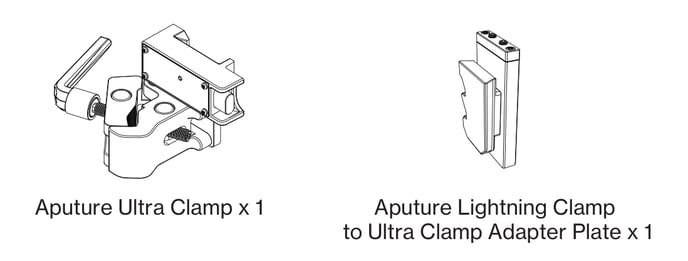
What Is in the Box
| Component | Quantity |
|---|---|
| Aputure Ultra Clamp | 1 |
| Aputure Lightning Clamp to Ultra Clamp Adapter Plate | 1 |
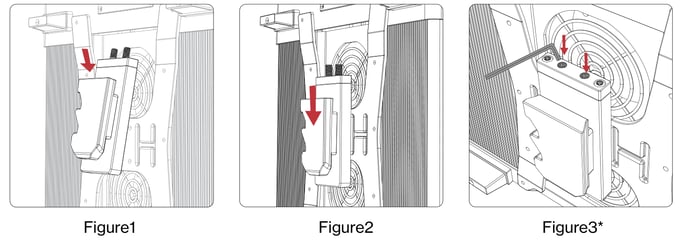
Installation requirement: use an H3 Allen wrench to fully tighten the screws and ensure a secure connection. Screws that are not tightened enough may let the product loosen, shift, or fall off.
1. Install the Adapter Plate
Fit the Lightning Clamp to Ultra Clamp Adapter Plate onto the Lightning mounting plate of the control box.
- Figure 1: Line the Adapter Plate up with the control box's Lightning mounting plate and lower it into position.
- Figure 2: Slide the Adapter Plate down until it seats fully against the mounting plate.
- Figure 3: Tighten the screws with an H3 Allen wrench until the plate is solidly fixed.
2. Mount the Control Box on the Ultra Clamp
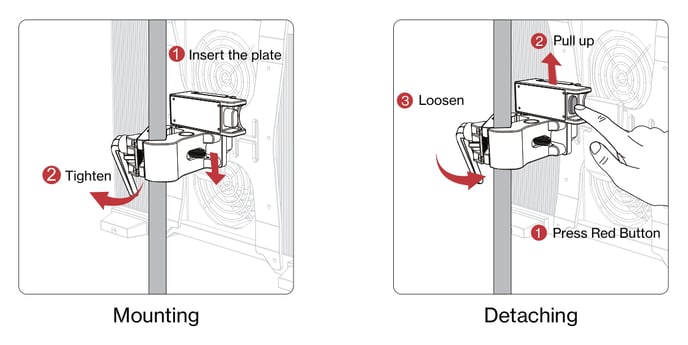
With the Adapter Plate installed, the control box mounts to the Aputure Ultra Clamp.
Mounting
- Insert the plate into the Ultra Clamp's slot.
- Tighten the clamp's handle to lock it onto the pipe or stand.
Detaching
- Press the red button on the clamp all the way down.
- Pull the control box straight up and clear of the clamp.
- Loosen the clamp's handle to remove the clamp itself.
Specifications
Aputure Ultra Clamp
| Specification | Value |
|---|---|
| Dimensions | 18.3 x 11 x 8.3 cm |
| Weight | 0.92 kg |
| Clamp range, square tube | 2 x 2 cm to 4 x 4 cm |
| Clamp range, round tube | Dia. 3/8 in (0.95 cm) to Dia. 2.25 in (5.72 cm) |
Lightning Clamp to Ultra Clamp Adapter Plate
| Specification | Value |
|---|---|
| Dimensions | 5.1 x 10.45 x 2.85 cm |
| Weight | 0.22 kg |
Compatible Products
| Series | Fixtures |
|---|---|
| STORM | XT52, 700x, 400x, 1200x, 1000c |
| Light Storm | 1200d Pro, 600d Pro, 600c Pro II, 600x Pro, 300x, C120d II, C300d II, 600d |
Fixtures that already ship with an Aputure Ultra mounting plate, such as the STORM CS32, do not need this kit. They mount to the Ultra Clamp directly, as described in STORM CS32 Getting Started.
Safety
- Read and understand all instructions before use.
- Do not disassemble the product yourself. If it is damaged, contact after-sales service.
- Do not leave the product exposed to high temperatures for extended periods, which can accelerate aging and deformation.
- This is a special device. Keep it out of reach of children.
- When the kit is used with a fixture, localized high temperatures can occur. Be careful to avoid burns.
- Keep the product away from flammable or volatile solvents such as alcohol and gasoline.