Advanced Cue Editing: Precision Control
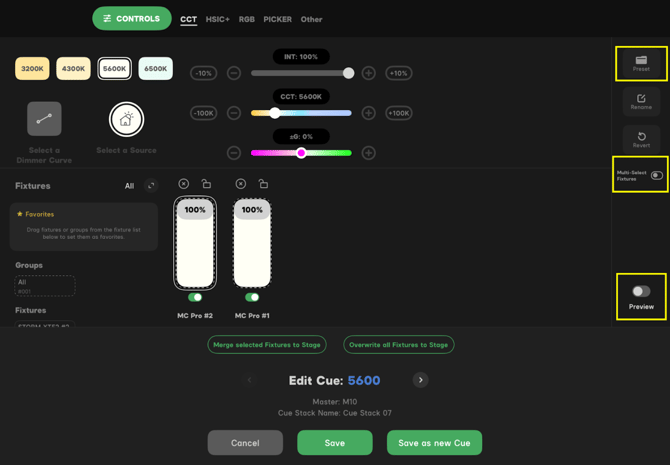
With version 2.3, the workflow for refining your looks is consolidated into a single, high-speed menu. By simply double-tapping a cue within your sequence, you enter a dedicated editing environment that allows you to adjust every parameter of your look without ever leaving the workspace.
-
Live Workspace & Multi-Select: Within this window, you have full access to intensity sliders, CCT, and color controls. For pros handling large rigs, the Multi-Select Fixtures toggle is essential—allowing you to modify groups of lights simultaneously rather than one by one.
-
The Preview Toggle: Before committing any changes, use the Preview switch. This allows you to see your adjustments live on set, ensuring the look is correct before you store the data.
-
Direct Preset Access: Your entire library of Presets is available in the right-hand menu. This allows you to quickly inject established looks or "palettes" into the specific cue you are editing.
-
Stage Integration (The Green Buttons): These are your "Output" commands. They allow you to take the data from your cue and push it live to the stage for immediate adjustment. For safety, "Send All Fixtures to Stage" now includes a confirmation step to prevent accidental overrides:
-
Merge Selected Fixtures to Stage: Takes only the fixtures you currently have selected and adds their cue data to whatever is currently live on your stage.
-
Overwrite All Fixtures to Stage: A "Master Override" that clears your current live look and replaces it entirely with the data from this specific cue.
-
-
Flexible Saving & Sequencing: * Save: Updates the existing cue with your new data.
-
Save as New Cue: Creates a fresh cue at the end of your stack.
- Copy to Next Cue: This new option allows you to push your current edits into the following cue in the sequence, ensuring seamless consistency across transitions.
-