
Sidus Link® provides four main modes in the Lighting Control System:
White Mode, Gel Mode, Color Mode and Effect Mode.
Tap any connected fixture in the fixture list to enter the Lighting Control System.
The Lighting Control System interface is divided into three parts:
- The top part: Control Modes
- The middle part: Control Mode Specific Functions
- The bottom part: Parameter Adjustment Settings
1. White Mode
White Mode includes CCT, Sourcetype and Sourcematch functions. In White Mode, users can quickly set the fixtures Color Temperature, G/M, Intensity and Dimming Curve.
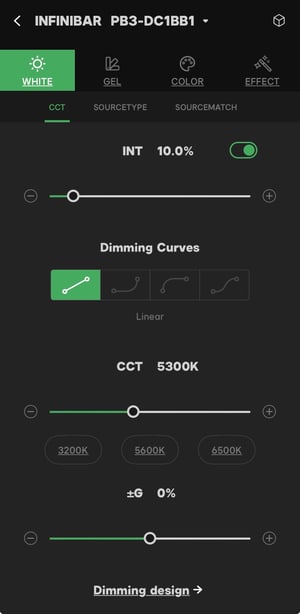
Figure 1 White Mode
1.1 CCT Function
Adjust the CCT parameters by adjusting the applicable Sliders.
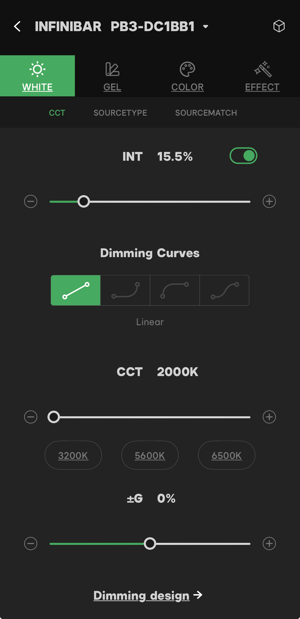
Figure 1.1 CCT function
1.1.1 Intensity
Users can adjust the fixture intensity from 0% - 100% with the slider, as well as turn intensity on/off with the green toggle button.
1.1.2 Dimming Curves
Select a Dimming Curve by pressing a Dimming Curve icon.
There are four types of Dimming Curves: Linear, Exponential, Logarithmic and S-curve.

Linear:
The intensity will change linearly across the dimming curve.

Exponential:
The Intensity will increase slowly at the low end and accelerate rapidly at the high end of the dimming curve.

Logarithmic:
The Intensity will increase rapidly at the low end and slowly at the high end of the dimming curve.

S-curve
The intensity will change slowly when adjusted from 0% - 20% and 80% - 100%. The intensity will change rapidly when increased from 20% - 80%.
1.1.3 CCT
The CCT slider adjusts the color temperature of the fixture.
Use the slider or the three shortcut buttons to adjust the color temperature.
1.1.4 G/M
The G (Green)/M (Magenta) slider adjusts the color shift from green to magenta.
1.1.5 Dimming Design
The Dimming Design function is used to create Fade-in and Fade-out effects for lighting fixtures.
- Enter the CCT adjustment page, then tap the Dimming design-> button to enter the Dimming Design adjustment page.
- Adjust the Begin Intensity slider in the Fade-in section to set the beginning intensity of the fade-in effect. Adjust the Duration slider to set the fade-in time.
- Adjust the Mid Intensity Slider in the Continue section to set the intensity during the effect. Adjust the Duration slider to set the continue time.
- Adjust the End Intensity Slider in the Fade-out section to set the intensity of the fade-out effect. Adjust the Duration slider to set the fade-out time.
- Tap the Play button to start the fade-in and fade-out lighting effect. Tap the Stop button to stop the effect.
- The Preview window in the Dimming design page displays a preview of the lighting effect.
- Tap the Delay setting window under the Preview window to set the delay time from 0 - 60 seconds.
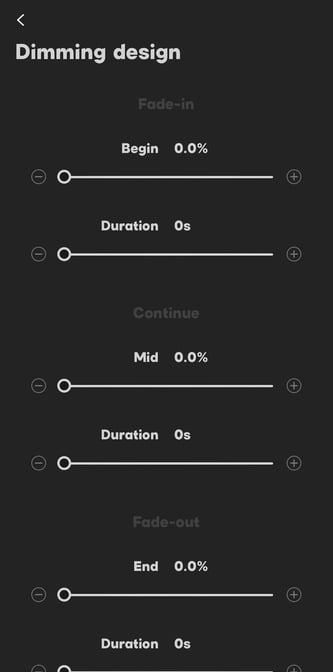
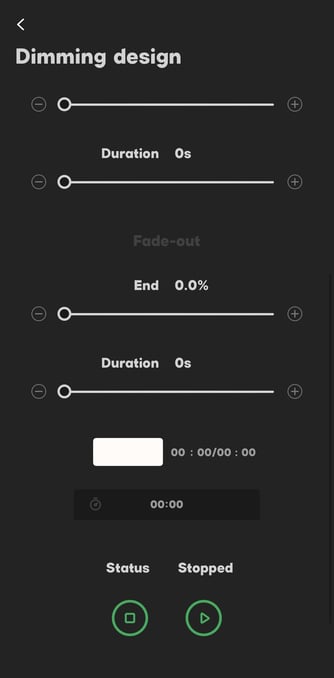
Figure 1.1.6 Dimming design
1.2 Source Type Function
Sidus Link® provides 17 frequently-used lighting sources as reference.
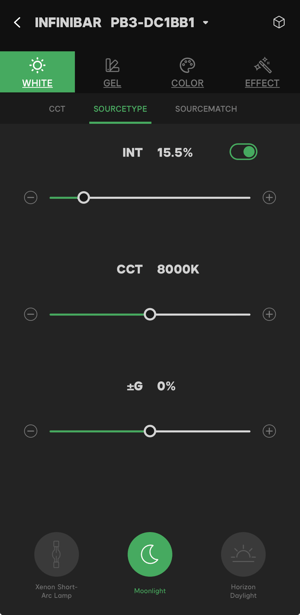
Figure 1.2 Source Type
Natural Sources:
 Sunrise/Sunset: 1850K
 Candle: 1900K
 Moonlight: 8000K
 Horizon Daylight: 5000K
 Day White: 5600K
 Daylight: 6500K
 Overcast sky: 7000K
 Blue Sky: 10000K
Film Lamps:
 Tungsten: 3200K
 Studio Lamp: 3200K
 Studio CP light: 3350K
 HMI 5600: 5600K
 HMI6000: 6000K
 High-Pressure Sodium Lamp: 2200K
 Warm White Halogen: 2700K
 Natural White Metal Halide: 4300K
 Xenon short-arc lamp: 6200K
Users can adjust the CCT and G/M of the selected source type.
1.3 Source Match Function
Use the Source Match function to easily match the fixtures color temperature to a nearby color temperature.
In the Source Match camera interface, tap Match to capture the current color temperature and the result will apply to the fixture automatically.
- Users can adjust the intensity, CCT and G/M of the fixture.
- Intensity adjustable range: 0.0% to 100.0%
- CCT adjustable range: ±300K
- G/M adjustable range: -100 - +100.
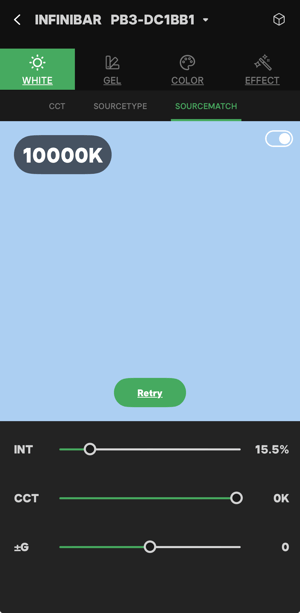
Figure 1.3 The source match function
2. Gel Mode
The Sidus Link® App provides two types of gel control functions: CTO/B and gels. The professional gels bank provides hundreds of ROSCO® and LEE® gels.
2.1 CTO/B Function
CTO/B function is based on two widely-used lighting sources: tungsten and daylight.
The Sidus Link® App provides 5 choices for both CTO and CTB functions.
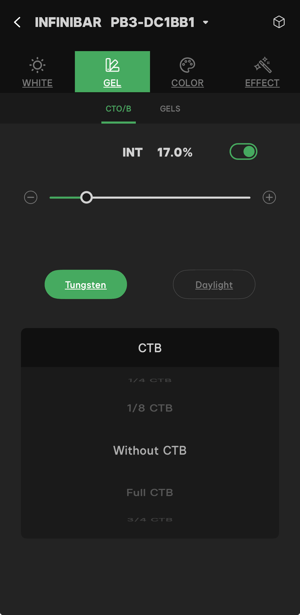
Figure 2.1 CTO/CTB function
-
5 CTB's for Tungsten: without CTB, 1/8 CTB, 1/4 CTB, 1/2 CTB, 3/4 CTB, and Full CTB;
-
5 CTO's for Daylight: without CTO, 1/8 CTO, 1/4 CTO, 1/2 CTO, 3/4 CTO, and Full CTO.
- Without CTB: 3200K
- 1/8 CTB: 3600K
- 1/4 CTB: 3800K
- 1/2 CTB: 4600K
- 3/4 CTB: 5500K
- Full CTB: 6500K
The approximate color temperature when using CTO:
- Without CTO: 6500K
- 1/8 CTO: 5500K
- 1/4 CTO: 4600K
- 1/2 CTO: 3800K
- 3/4 CTO: 3600K
- Full CTO: 3200K
2.2 Gel Function
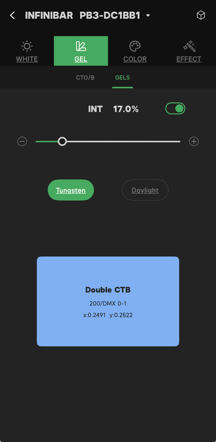
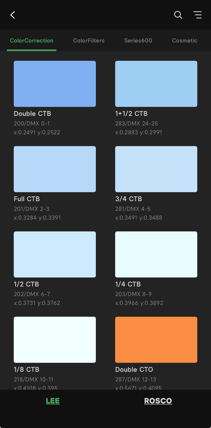
The Sidus Link® App provides more than 300 types of LEE® and ROSCO® gels*.
Choose the desired CCT base with the Tungsten and Daylight buttons, then choose a gel: 3200K(Tungsten) and 5600K(Daylight).
-
LEE® Series:
- Color Correction
- Color Filters
- 600 Series
- Cosmetic
- 700 Series
-
ROSCO® Series:
- Color Correction
- CalColor
- Storaro Selection
- Cinelux
 |
 |
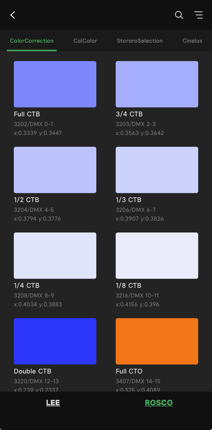 |
| Figure 2.2-1 Gel function | Figure 2.2-2 LEE® Series | Figure 2.2-3 ROSCO® Series |
Special Note:
Lee® is the trademark of Lee Electric (Lighting) Ltd. and Panavision Inc.
Rosco® is the trademark of Rosco Laboratories Inc.
Other products and company names mentioned herein may be trademarks of different companies respectively.
Note:
Users can search a gel with name and numbers or filter the gels by series, number, name and color.
The Sidus Link® App will support hue and saturation modification for the gels in the future.
3. Color Mode
The Sidus Link® App provides professional and accurate HSI, RGB and CIE coordinate functions in Color Mode. The Color Picker function can match any color with just a click.
There are three professional color gamuts in the CIE coordinates: A.Gamut(BT.2020), the DCI-P3, and the BT.709.
3.1 HSIC+ Function
There are two types of interfaces for HSIC+ control: Slider and Color Wheel.
-
Slider Interface:
- INT: from 0% to 100%
- CCT: 2000K - 10000K
- G/M: -100 - +100
- HUE: 0° - 359°
- SAT: 0% - 100%
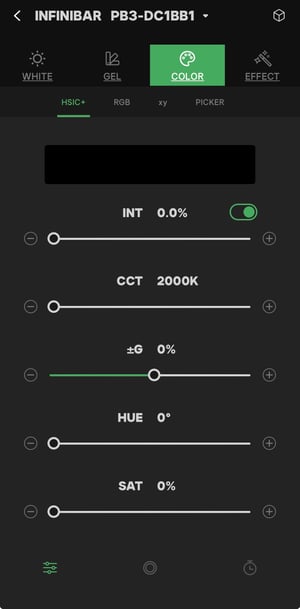
Figure 3.1-1 Slider interface
Color Wheel Interface:
- INT: from 0% to 100%
- CCT: 2000K - 10000K
- G/M: -100 - +100
- Color Wheel: Users can adjust the hue by choosing different angles on the color wheel. users can adjust the color saturation by moving close to or further away from the center of the color wheel.
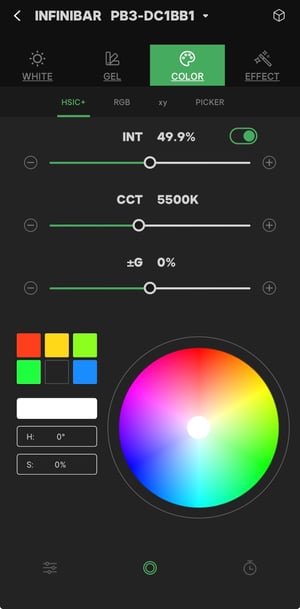
Figure 3.1-2 Color Wheel Interface
Note:
Sidus Link® App will provide the gamut switch for the HSI function in the future.
Some fixtures only support HSI control, which omits CCT and G/M parameter control.
3.2 RGB Function
Users can manually adjust the R, G, B and overall intensity values to choose a color.
INT: Adjust the overall intensity output R: Adjust the Red output from 0 to 255
G: Modify Green output from 0 to 255
B: Modify the Blue output from 0 to 255
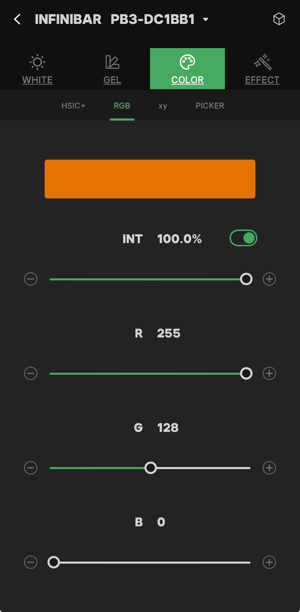
Figure 3.2 RGB Function
3.3 xy-CIE Coordinates Function
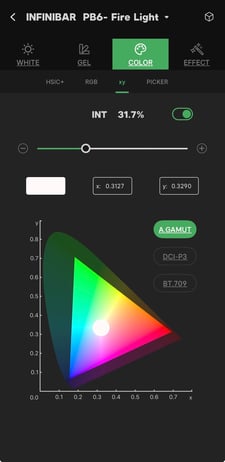
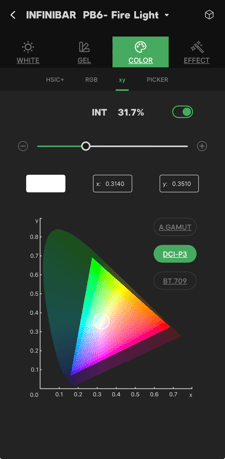
- Sidus Link® provides three gamuts in xy-CIE coordinates. The three gamuts are A.Gamut (BT.2020), DCI-P3 and BT.709. Choose the desired gamut.
- xy Coordinates: xy values can match an exact color in the CIE1931 color system. Change the value of xy to create a new color. Tap to choose a color with the xy coordinates graphic.
 |
 |
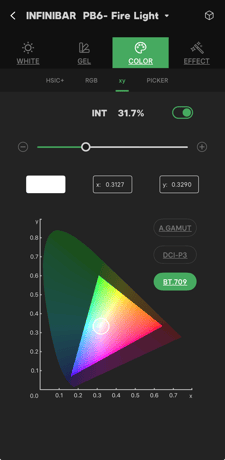 |
| Figure 3.3-1 A.GAMUT | Figure 3.3-2 DCI-P3 | Figure 3.3-3 BT.709 |
3.4 Color Picker Function
The Color Picker is another powerful color selection tool. Users can choose any color from the environment and apply it directly to the fixture. With the Color Picker function, users can point the camera at the color in the environment, then click the "Pick up" button to capture the color. The captured color will apply to the fixture automatically.
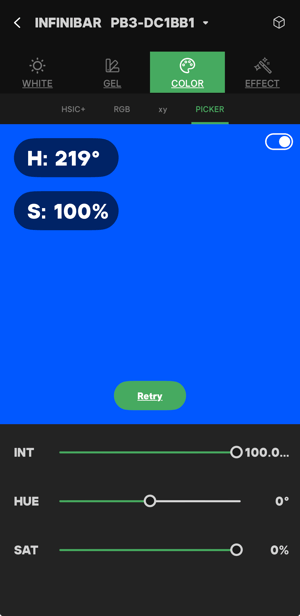
Figure 3.4 Color Picker function
There are intensity, hue and saturation adjustments in the Color Picker function parameters.
- INT: 0.0% - 100.0%
- HUE: -10° - +10°
- SAT: ±10%.
Note:
Color adjustment will be limited by the captured color. For example, the minimum saturation is 80%.
4. Effect Mode
Effects are built-in lighting effects in fixtures. Sidus Link® App has designed and selected 15 commonly-used lighting effects for users.
Note:
The actual lighting effects quality depends on the fixtures.
- Daylight Fixtures: 8 effects
- Bi-color Fixtures: 9 effects
- Color-Lite Fixtures: 9 effects
- Color-Pro Fixtures: 15 effects
4.1 Fireworks
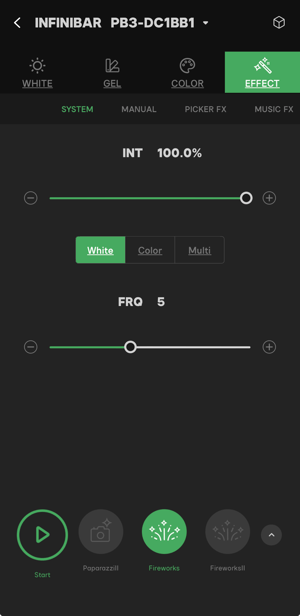
Figure 4.1 Fireworks
Fireworks Parameters:
- INT: The brightness of the fireworks effect. Adjustable range is from 0% - 100%
- Color of Fireworks: CCT/Color/Multi
- FRQ: 1-10 and random. 1 represents the fireworks frequency as minimum, and 10 represents the fireworks frequency as maximum.
Note:
- In CCT Mode: The color temperature of the fireworks will be a random value in the range of 1600K - 10000K (the range may be limited by the fixtures ability)
- In Color Mode: The color of the fireworks will be random
- In Multi-Mode: The color of the fireworks will be a random color or color temperature value.
4.2 Faulty Bulb
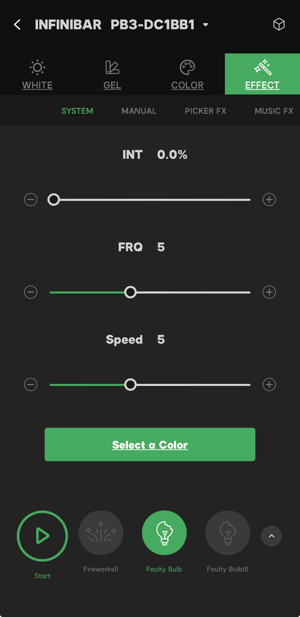
Figure 4.2 Fault Bulb
Faulty Bulb Parameters:
- INT: The intensity of the Faulty Bulb effect. Adjustable range: 0% - 100%
- Source base: CCT/HSI/GEL
- FRQ: 1-10 and Random. 1 represents the flicker frequency as minimum, and 10 represents the flicker frequency as maximum.
- Speed: 1-10, the speed of the flicker.
Note:
The available source base will differ between fixtures.
4.3 Lightning
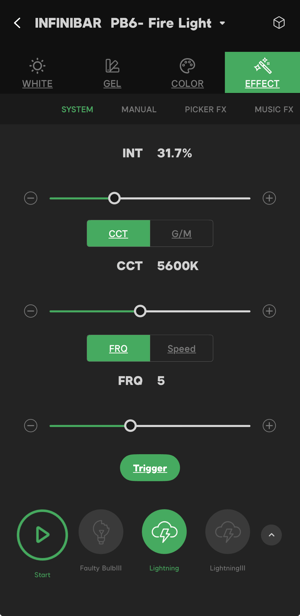
Figure 4.3 Lightning
Lightning Parameters:
- INT: The brightness of the lightning. Adjustable rang is 0% - 100%
- CCT: Adjustable color temperature range is 2000K - 10000K. (the range may be limited by the fixture ability);
- G/M: Adjust the G/M parameters. (the range may be limited by the fixture ability)
- FRQ: 1-10 and Random. 1 represents the lightning frequency as minimum and 10 represents the lightning frequency as maximum.
- Speed: 1-10. The speed of the lightning
- Trigger: Trigger the effect manually
4.4 TV
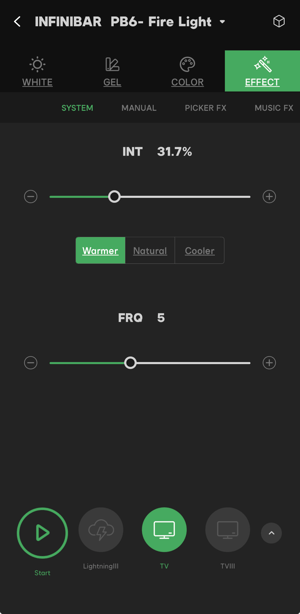
Figure 4.4 TV
TV Parameters:
- INT: The intensity of the TV effect. Adjustable rang is from 0% - 100%
- CCT of TV: Warmer, Natural & Cooler
- Speed: 1-10. 1 represents the minimum.
Note:
- Warmer: A random color temperature value in the range of 2800K to 4700K
- Natural: A random color temperature value in the range of 4700K to 6500K
- Cooler: A random color temperature value in the range of 6500K to 10000K
4.5 Pulsing
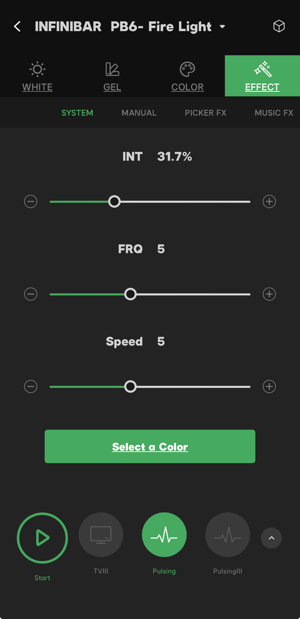
Figure 4.5 Pulsing
Pulsing Parameters:
- INT: The intensity of the Pulsing effect. Adjustable rang is from 0% - 100%
- Source Base: CCT, HSI & GEL
- FRQ: 1-10 and random. 1 represents the pulsing frequency as minimum and 10 represents the pulsing frequency as maximum
- Speed: 1-10, the speed of the pulsing. 1 represents the minimum.
Note:
The available Source Base will be different for different fixtures.
4.6 Strobe
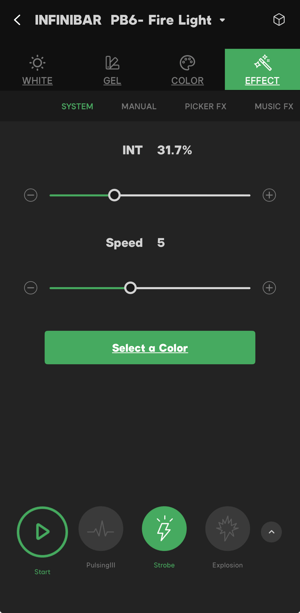
Figure 4.6 Strobe
Strobe Parameters:
- INT: The intensity of the strobe. Adjustable rang is from 0% - 100%
- Source Base: CCT, GEL & HSI
- FRQ: 1-10 and random. 1 represents the strobe frequency as minimum and 10 represents the strobe frequency is maximum.
- Speed: 1-10 and random. The speed of the strobe. 1 represents the minimum speed.
Note:
The available Source Base will be different for different fixtures.
4.7 Explosion
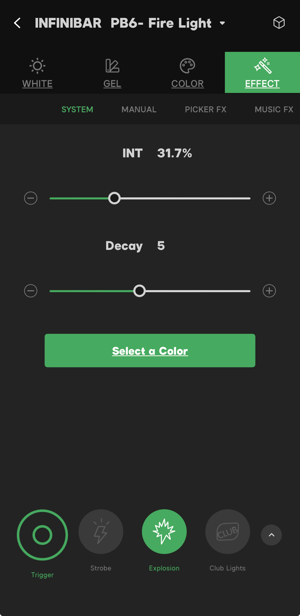
Figure 4.7 Explosion
Explosion Parameters:
- INT: The intensity of the explosion effect. Adjustable rang is from 0% - 100%
- Source Base: CCT, HSI & GEL
- Decay: 1-10. The fading speed of explosion. 1 represent the slowest speed.
- Trigger: Manual trigger only.
Note:
The available Source Base will be different for different fixtures.
4.8 Club Lights
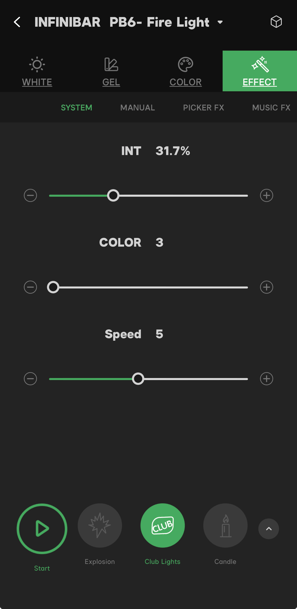
Figure 4.7 Club Lights
Club Light Parameters:
- INT: The intensity of the Club Lights effect. Adjustable rang is from 0% - 100%
- Color: 3/6/9/12/15/18/24/36. The number represents how many colors will include in the change.
- Speed: 1-10. The speed of color changing. 1 represents the slowest speed.
4.9 Candle
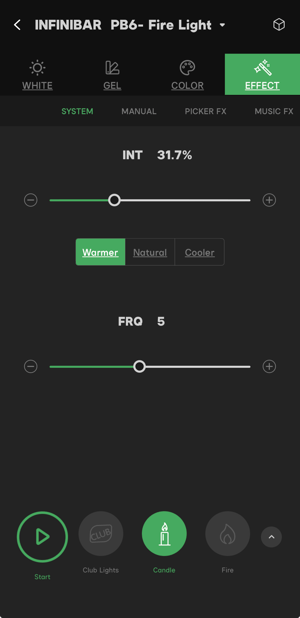
Figure 4.9 Candle
Candle Parameters:
- INT: The Intensity of the candle effect. Adjustable rang is from 0% - 100%
- CCT of candle: Warmer, Natural & Cooler
- Speed: 1-10, the speed of flame flicker. 1 represents the slowest speed.
Note:
- Warmer: A random color temperature value in the range of 1400K - 1700K
- Natural: A random color temperature value in the range of 1700K - 2000K
- Cooler: A random color temperature value in the range of 2000K - 2300K
4.10 Fire
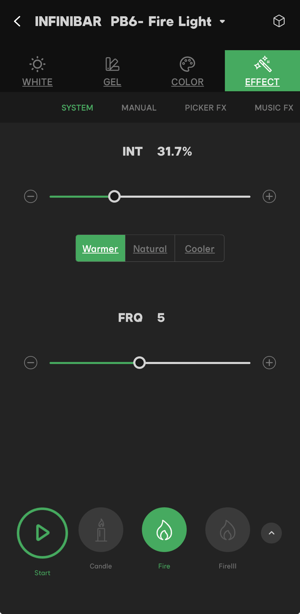
Figure 4.10 Fire
Fire Parameters:
- INT: The intensity of the fire effect. Adjustable rang is from 0% - 100%
- CCT of fire: Warmer, Natural & Cooler
- Speed: 1-10, the speed of flame flicker. 1 represents the slowest speed.
Note:
- Warmer: A random color temperature value in the range of 1800K - 2000K
- Natural: A random color temperature value in the range of 2200K - 2600K
- Cooler: A random color temperature value in the range of 2600K - 3000K
4.11 Welding
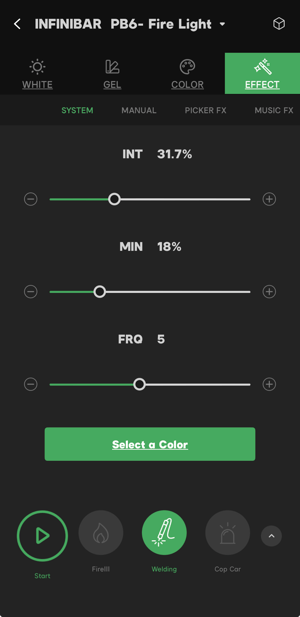
Figure 4.11 Welding
Welding Parameters:
- INT: The intensity of the welding effect. Adjustable rang is from 0% - 100%;
- Source Base: CCT, HSI & GEL
- MIN: The intensity when the welding effect is not flickering.
- FRQ: 1-10. 1 represents the welding flame frequency as minimum and 10 represents the welding flame frequency as maximum.
Note:
The available Source Base will be different for different fixtures.
4.12 Cop Car
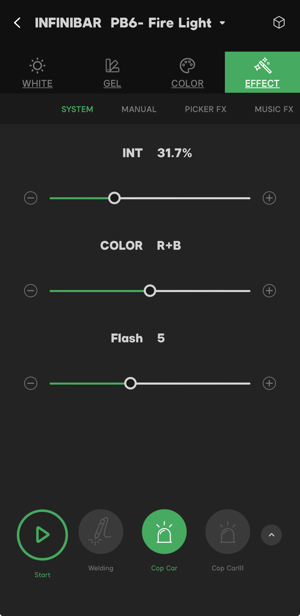
Figure 4.12 Cop car
Cop Car Parameters:
- INT: The intensity of the cop car effect. Adjustable rang is from 0% - 100%
- Color: Red/Blue/Red, Blue/Blue, White/Red, Blue and White
- Flash: Flash 1-5. Cycle 1-5.
Note:
- When select flash 1(2, 3, 4, or 5), the fixture will flash along with the first color for 1(2, 3, 4, or 5) time (s) then change to the second color and flash for another 1(2, 3, 4, or 5) time(s).
- Cycle 1 means all of the selected colors will flash at the same time.
- Cycle 2 (3, 4, or 5) means that the fixture will flash 1 time with the first color, then flash twice with the second color, then 3 times with the third color and continue.
4.13 Color Chase
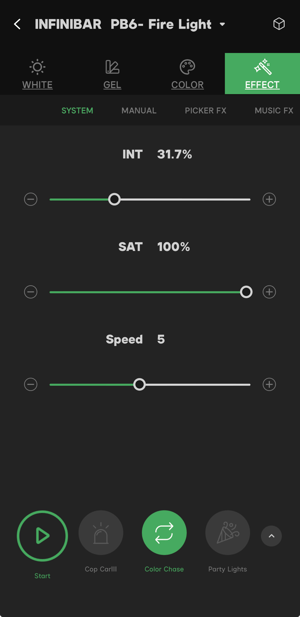
Figure 4.13 Color chase
Color Chase Parameters:
- INT: The intensity of the color chase effect. Adjustable rang is from 0% - 100%
- SAT: The saturation of the colors. The adjustable range is 0% - 100%
- Speed: The speed of the color changes. 1 represents the slowest speed.
4.14 Party Lights
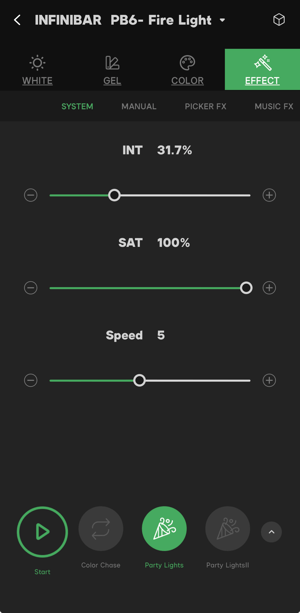
Figure 4.14 Party Lights
Party Lights Parameters
- INT: The intensity of the party lights effect. Adjustable rang is from 0% - 100%
- SAT: The saturation of the colors. The adjustable range is 0% - 100%
- Speed: The speed of color changing. 1 represents the slowest speed.
4.15 Paparazzi
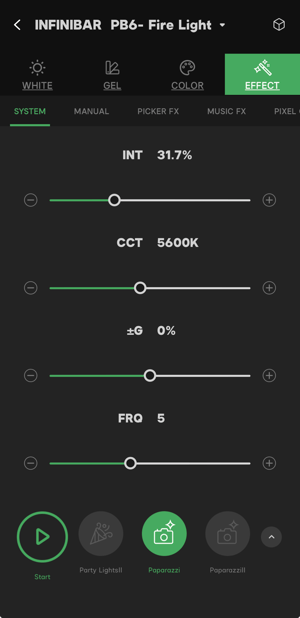
Figure 4.15 Paparazzi
Paparazzi Parameters:
- INT: The intensity of the paparazzi effect. Adjustable rang is from 0% - 100%
- CCT: The adjustable color temperature range is from 1600K - 10000K (the range may be limited by the fixture ability)
- G/M: M1.0-G1.0. Users can balance the light color from Green to Magenta
- FRQ: 1-10. The frequency of the flashes. 1 represents the minimum frequency.
Note:
The available Source Base will be different for different fixtures.