
1. Sidus Link® Workflow
Sidus Link® App presents a complete workflow, from lighting design, scene blocking, power management, fixture statistic, shooting schedule to on-set lighting control, Sidus Link® provides the professional solution.
In the lighting design stage, Diagram Master™ could help users draw the lighting diagram quickly. With the shooting schedule function, users could arrange the shooting plan easily. Furthermore, the Diagram Master™ could generate the warp-up list and the power statistics automatically and make the on-site shooting organized and safe.
In the pre-set stage, the rigging team could set all the fixtures and networks up and share the scene presets with team members via the CC group.
In the on-site shooting stage, the gaffer and camera crew could control all fixtures simultaneously.
2. Workspace
Sidus Link® provides many powerful productive features. The entrance of different functions locates in the workspace.
- The Lighting Control System could manage and control the lighting fixtures wirelessly and achieve diverse lighting effects;
- With abundant preset icons, quick editing tools, shooting schedule and wrap-up list features, Diagram Master™ supports quick diagram drawing and on-site shooting arrange;
- The Filming Tools transfer the smart device to be the professional Optics Calculator and Light Meter;
- CC Group is designed for team collaboration, team members could share and collaborate with each other;
- The setting and users personal center could manage the user's profile, fixture information and app setting.
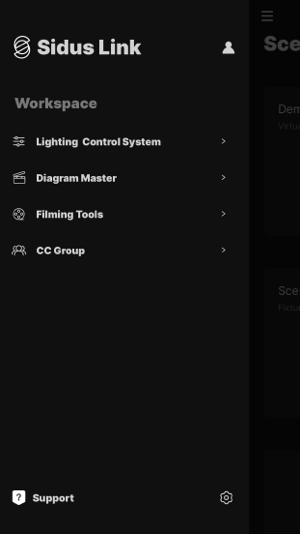 Figure 2 Workspace