
Released 9-22-26
Download the Update Here.
https://apps.apple.com/us/app/sidus-link-pro/id1574126730
Version 2.4.2 introduces the Pixel Control Suite, a rebuilt pixel editing workflow for pixelated fixtures like INFINIBAR, NOVA II, NOVA 9 °, and INFINIMAT. It adds gradient fills, gesture-based multi-select, and control over whether multiple pixelated fixtures are edited together, separately, or as one continuous run. This release also ships DMX profile, cue, virtual fixture, Illumination Handbook, and account management improvements.
New Features
-
Pixel Control Suite
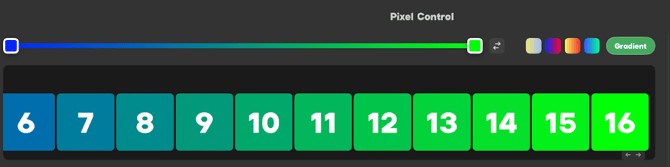
- Added a gradient row above the pixels. Select a run of pixels, set the color of the first and last pixel, and Sidus Link Pro fills the gradient between them automatically
- Added advanced pixel selection: multi-select, all, odd, even, first half, second half, and inverted selection
- Added press, hold, and drag to multi-select a range of pixels
- Added a Mapping Method control for when multiple pixelated fixtures are selected. Control Fixtures Together mirrors a pixel edit across every selected fixture, Control Fixtures Separately edits each fixture independently, and Control Fixtures Continuously treats the whole selection as one continuous pixel run so a single gradient can span every fixture
- Added a pixel order button to each pixelated fixture, used to set the selection order under Control Fixtures Continuously
- Gradient selection now uses HSIC+ control instead of HSI or CCT, so a gradient can run between a CCT value and a hue, for example 3200K to blue
- Added customizable pixel layouts to DMX profile building. Specify rows and cells, for example 2 rows of 4, so non-linear fixtures such as INFINIMAT display as the correct array
- Added a Pixel Window button to the Parameter Control area in Layout View, matching the 3D Visualizer
- More Info about Pixel Control
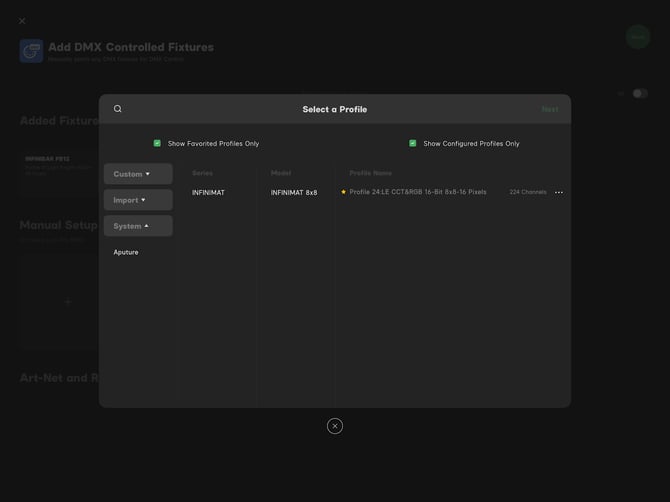
Favorite DMX Profiles
Enhancements
-
DMX Profiles and Fixture Management
- Added a Show Patched Lights Only filter to the Select a Profile screen
- Added Show Favorite Profiles Only and Show Configured Profiles Only filters to the Profile Management screen
- Profile preview (the eye icon) now labels pixelated profiles as Pixel 1, Pixel 2, and Global
- View Profile now shows the pixel count for pixelated fixtures, with pixels grouped together
- The Resource Library now supports manually adding fixture profiles
- Custom profile creation now supports choosing a fixture type (Point, Panel, or Linear Light) so the correct generic model appears in the 3D Visualizer
- Custom fixtures that arrive inside an imported show file can now be copied and edited from Profile Management
- DMX charts with a +/- Green channel can now be entered in reverse, for example 255 to 1
-
Adding Fixtures
-
Cues
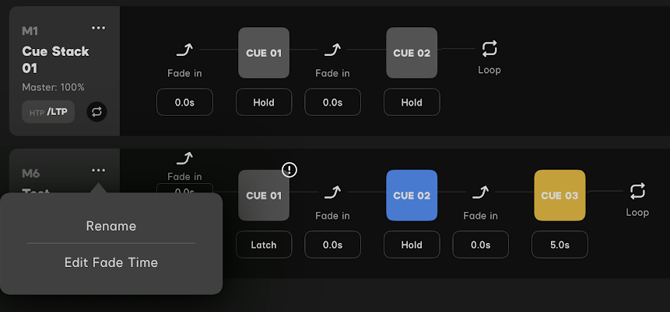
- Added Rename Cue Stack to the 3-dot menu in Edit Cue Sequence
- Added an Unload option, with a confirmation prompt, for a running cue in Edit Cue Sequence
- Added Change Cue Type to the press-and-hold context menu on a cue card in Cue Masters, exposing Cue Name, Color, Cue Action, and Fade Time
- More Info Here
Action Panel
- Adding an Unload button to an existing button now inserts it in place and shifts the following button down, instead of overwriting it.
- The A keyboard shortcut now toggles the Action Panel: press once to open, press again to close.
-
Virtual Fixtures
- Added Batch Auto-Patch for Virtual Fixtures to allow for patching multiple virtual fixtures together.
-
Groups
- Added a light bulb icon when creating a group, used to identify a fixture by flashing it over both Sidus BT and DMX
-
Layout View
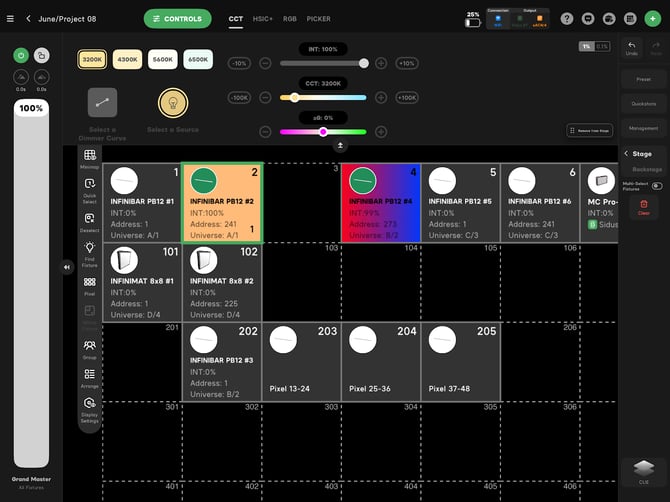
- Added Intensity Value to Layout View grid display
- Added a Show/Hide Options title to the Display Settings pop-up
DMX Output Window
-
- Added an option to expand the DMX Output Window so an entire universe is visible at once, without scrolling
-
Import Show
- Reordered the import flow. Select the show file first, then choose the project to attach it to. The file list and the project list each offer Import Files and Import Projects entry points
-
Account
- Added Account and Security editing to iPad and Mac, matching the mobile app. You can change the identifier your account was registered with, either an email address or a phone number
-
Subscription
- Added subscription-aware pop-ups and in-app navigation
Bug Fixes
-
Pixel Control
- Fixed a pixelated fixture inside a group of pixelated fixtures not offering pixel editing for the group
- Fixed multi-select plus pixel mode not allowing color and intensity to be set across multiple fixtures and their pixels at once
- Fixed the pixel viewing window cutting off the bottom four pixels on an INFINIMAT 8x8 patched to P13: LE 24 Pixels. The window now resizes to show every pixel at once
-
Layout View and 3D Visualizer
- Fixed a fixture's color and intensity not loading into the Parameter Control area when the fixture is selected while playing in a running cue, in both Layout View and the 3D Visualizer. Existing values can now be modified
- Fixed inverted defaults under Set Elements > Wall in the 3D Visualizer. Width now defaults to 3.91 m and Depth to 0.36 m
- Redesigned the first-open help bubbles in Layout View so each function occupies a single row, with the iPad gesture and the desktop equivalent side by side
-
Illumination Handbook
- Fixed the back caret resetting to the first fixture category. It now returns to the category you came from
- Added the F10 Fresnel to the accessory list
- Added the Spotlight Mini Zoom to the accessory list for the LS 60d and LS 60x
- Fixed the distance calculator returning incorrect lux values when an accessory is selected
- Fixed the luminance calculator returning incorrect values for Spot fixtures at 1 m
-
Mac (Designed for iPad)
- Removed the non-functional Go To Settings button from Auto-Patch Step 2. Because apps designed for iPad cannot open the macOS Wi-Fi interface, the step now shows instructions for joining the Sidus Four network manually through System Settings > Wi-Fi before returning to Sidus Link Pro