![Aputure_amaran_KnowledgeBase_Logo.png]](https://help.aputure.com/hs-fs/hubfs/Knowledge%20Base/company%20files/Aputure_amaran_KnowledgeBase_Logo.png?height=40&name=Aputure_amaran_KnowledgeBase_Logo.png)
Connecting the Lighting Console to the STORM CS32 Control Box
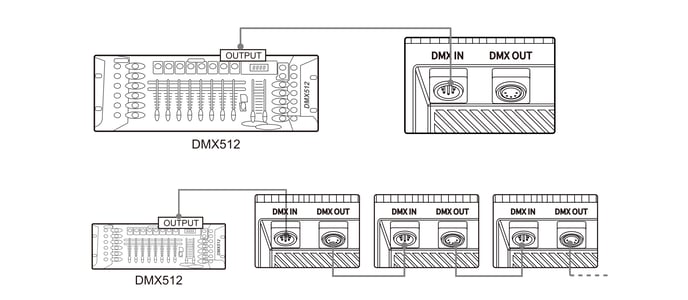
Connect a DMX512 lighting console's output to the Control Box's DMX IN port using a standard 5-pin DMX cable. To control multiple fixtures from one console, daisy-chain them: connect the first fixture's DMX OUT to the next fixture's DMX IN, and so on.
Channel Selection
When the DMX channel number set on your console matches the DMX Address set on the Control Box under DMX Settings, you can adjust the fixture's brightness and other parameters from the console. This works for both single-fixture connections and multi-fixture daisy chains.
Download the STORM CS32 DMX Chart from the Downloads section of the STORM CS32 product page.