![Aputure_amaran_KnowledgeBase_Logo.png]](https://help.aputure.com/hs-fs/hubfs/Knowledge%20Base/company%20files/Aputure_amaran_KnowledgeBase_Logo.png?height=40&name=Aputure_amaran_KnowledgeBase_Logo.png)
Open Control Settings > CRMX Settings from the Menu to configure CRMX wireless DMX.
Toggle CRMX on or off by rotating and pressing the Select Wheel. When CRMX is enabled and a CRMX transmitter within range initiates linking, the fixture automatically switches to the linking screen regardless of the current menu. Once linking completes, the interface jumps to the DMX status page.

CRMX Mode
Set the fixture to RX mode to receive CRMX from a transmitter, or TX mode to link and unlink other receivers. In RX mode, you can also enable CRMX to DMX Out to pass the received signal out over wired DMX512.


Linking Key
Rotate the Select Wheel to Linking Key and short-press to enter its settings:
- Reset to Default – resets the linking key to 00000000
- Linking Key Settings – short-press the Select Wheel to edit a digit (available range 0 to 9); short-press again to confirm. The key must include at least three non-zero digits. Choose Apply to use the key immediately, or Apply & Save to also store it as a preset.
- Linking Key Presets – save up to 10 linking keys and recall, edit, or apply them later.


Signal Strength and Connection Status
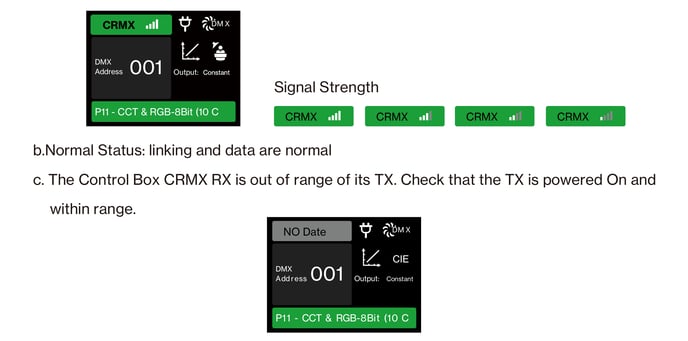
When linked to a CRMX transmitter, the DMX status bar shows the connection status and signal strength:
- Signal strength – indicates connection stability. If it's too low, adjust the position between the transmitter and Control Box to improve it.
- Normal status – linking and data are normal.
- Out of range – the Control Box's CRMX receiver can't reach its transmitter. Check that the transmitter is powered on and within range.
- No connection – the transmitter was previously connected but is now out of range or powered off.