![Aputure_amaran_KnowledgeBase_Logo.png]](https://help.aputure.com/hs-fs/hubfs/Knowledge%20Base/company%20files/Aputure_amaran_KnowledgeBase_Logo.png?height=40&name=Aputure_amaran_KnowledgeBase_Logo.png)
Light Modes can only be accessed when no DMX data is present. Make sure DMX data is not being received by the CS32 Control Box in order to use Light Modes.
Press the Light Mode Button on the Control Box to open the Light Mode Menu, then choose between CCT, HSIC+, RGB, GEL, xy, Source, FX, and Sidus FX.

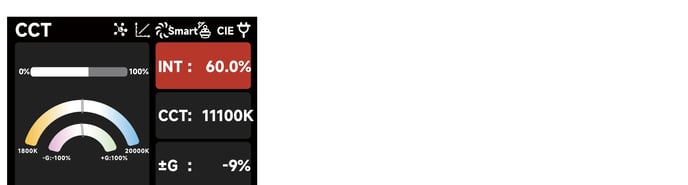
CCT
Adjust Color Temperature (1800K–20000K) and ±Green (-100% to +100%).
HSIC+
Adjust Intensity (0–100%), Color Temperature (1800K–20000K), ±Green (-100% to +100%), Hue, and Saturation.

RGB
Set Red, Green, and Blue values (0–100%) to mix the desired color, then use Master Intensity to raise or lower overall brightness without changing the color mix.

GEL
Choose a base color temperature of 3200K or 5600K, then select a matching Rosco or LEE gel to output the corresponding color.

xy
Set intensity and precise x/y coordinate values (0–0.8000).

Source
Select a light source to mimic (Tungsten, Incandescent, Halogen, Antique Bulb) and fine-tune its xy coordinates.

FX
Choose between FX modes: Fire II, Paparazzi, Faulty Bulb II, TV II, Pulsing II, Party Lights, Club Lights, Color Chase, Candle, Welding II, Cop Car II, Strobe II, Lightning II, Fireworks, and Explosion II.

Sidus FX
Rotate the Select Wheel to Sidus FX, then short-press to enter the custom lighting effects page. Choose between Capture FX and Rhythm FX; each supports up to 10 saved custom presets. A slot labeled "NO FX" is empty; a slot labeled "Untitled" already contains a saved effect.
Custom lighting effects are downloaded to the fixture through the Sidus Link app.
