![Aputure_amaran_KnowledgeBase_Logo.png]](https://help.aputure.com/hs-fs/hubfs/Knowledge%20Base/company%20files/Aputure_amaran_KnowledgeBase_Logo.png?height=40&name=Aputure_amaran_KnowledgeBase_Logo.png)
Powering On/Off
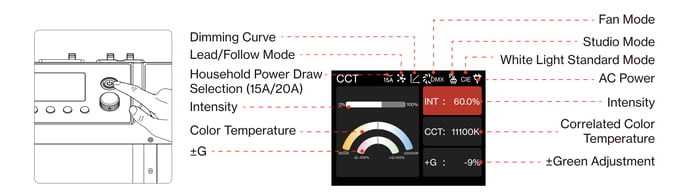
Connect the power supply and press the Power Button on the Control Box to turn the fixture on or off.
Status Indicators
The STORM CS32 adds status indication on top of fault codes, letting you judge a fixture's working status from a distance. Both the Control Box and the Lamp Head have their own indicator light.
| Indicator Light | Status | Description |
|---|---|---|
| Control Box | Off | No power supply to the Control Box, or the Control Box's power supply is damaged |
| Control Box | Solid Red | Power supply works normally, but the control unit is malfunctioning |
| Control Box | Solid Green | Power supply and control unit are both operating normally |
| Control Box | Solid Orange | Power supply is normal, but the control unit has detected a product fault |
| Lamp Head | Off | No power supply to the Lamp Head, or the Lamp Head's power supply is damaged |
| Lamp Head | Solid Red | Power supply works normally, but the Lamp Head control unit is malfunctioning |
| Lamp Head | Solid Green | Power supply and control unit are both operating normally |
| Lamp Head | Solid Orange | Power supply is normal, but the Lamp Head control unit has detected a product fault |
Shortcut Buttons
| Operation | Description |
|---|---|
| Long-press MENU for 5 seconds | Opens the Factory Reset screen |
| Long-press BACK for 5 seconds | Opens the Sidus BT Reset screen |
| Short-press BACK from the MENU interface | Returns to the current control source |