![Aputure_amaran_KnowledgeBase_Logo.png]](https://help.aputure.com/hs-fs/hubfs/Knowledge%20Base/company%20files/Aputure_amaran_KnowledgeBase_Logo.png?height=40&name=Aputure_amaran_KnowledgeBase_Logo.png)
Open Control Settings > Sidus BT Settings from the Menu to manage Bluetooth pairing.
Turn Sidus BT on or off, or trigger a Sidus BT Reset. The fixture's Bluetooth serial number is shown on this screen to help you quickly locate it for pairing.

After a successful reset, pair and connect to the fixture through the Sidus Link app. If the reset fails, a Reset Failed message appears briefly before returning to the Sidus BT Settings screen.
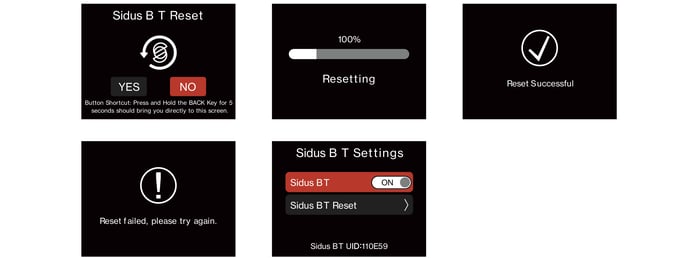
Shortcut: press and hold the BACK button for 5 seconds to jump directly to the Sidus BT Reset screen.