
Released 6-16-26
Download the Update Here.
https://apps.apple.com/us/app/sidus-link-pro/id1574126730
Now on Mac for the first time. Download from the Mac App Store.
New Features
-
Action Panel (Pro and MAX Plans only)
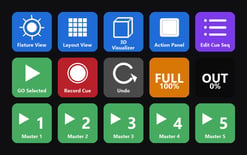
- Added Action Panel: a new full-screen view that turns your 10 Cue Masters into oversized, customizable buttons
- Cue Stack Execution for sequenced playback
- Single Cue Execution for always-this-state buttons
- Three button sizes: Small, Medium, Large
- 6-digit Lock Access passcode for clean operator handoff
- Auto-Load Action View when locked
- Quickshots can now live on a Cue Master and on Action Panel buttons
- More Info Here
-
Mac OS Desktop Support (Free across every plan)
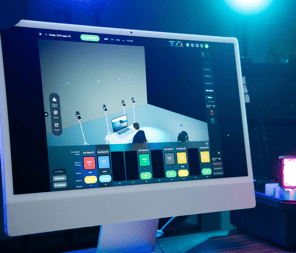
- Added macOS support, available for the first time on the Mac App Store
- Apple Silicon required (M-series Macs)
- Same show files, 3D Visualizer, and cloud syncing as iPad
- One subscription covers both Mac and iPad
- Pro-level capabilities (DMX output, multi-universe, full 3D Visualizer toolset) require Pro or MAX
- More Info Here
-
100+ Keyboard Shortcuts
- Added 100+ keyboard shortcuts for view switching, cue execution, recording, and Quickshots
- Works on Mac and iPad with any Bluetooth or Smart Keyboard
- Headline keys: Q/W/E/R/T for views, Space to fire, Cmd-R to record, Cmd-K for Quickshot, Cmd-Opt-Shift-B for Blackout
- Download the Keyboard Shortcut PDF here.
- With the Keyboard Shortcuts, this enables Stream Deck shortcuts! More info here.
- More Info on Keyboard Shortcuts Here
-
Quickshots for DMX
- Quickshots now capture every fixture on stage, including DMX fixtures
- On recall, DMX fixtures in the Quickshot replace the live state on the stage
- Combine with Quickshots on Cue Masters to fire stage-wide DMX + Bluetooth states from a single Action Panel button
Enhancements
-
Top Bar and App Level
- Added battery level indicator in the top bar (updates every 5 minutes to preserve battery)
- Added Create Local Backup option in the Tools menu, save a local copy of the show file without closing the show
-
Cue Interface
- Cue Wait Time extended up to 600 seconds with manual text entry
- Undo step limit increased from 100 to 200
-
Fixture Management
- Added Sorting: Alphabetical, Patch Order, or Order Added
- Added Grouping: Fixture, Fixture and Profile, Universe, Name, or None
-
Quickshots
-
- Default Quickshot transition is now Crossfade between Quickshots
-
-
Layout View
- Lock button now locks the Map and fixtures from moving.
- Minimap automatically unlocks when the View is no longer locked
- Quick Select automatically unlocks when executing if the target fixture is outside the locked view
- Arrange, Pixel, and Whole Fixture controls are disabled when the view is locked
Bug Fixes
-
3D Visualizer
- Fixed individual pixel control of INFINIBAR LE profiles not being honored
- Fixed controllable pixel count not matching the DMX Profile
- Fixed [Pixel] flag not appearing on pixel-capable fixtures in 3D Visualizer
-
- Fixed Profile changes in Management not updating in Object Settings until exiting and re-entering 3D View