![Aputure_amaran_KnowledgeBase_Logo.png]](https://help.aputure.com/hs-fs/hubfs/Knowledge%20Base/company%20files/Aputure_amaran_KnowledgeBase_Logo.png?height=40&name=Aputure_amaran_KnowledgeBase_Logo.png)
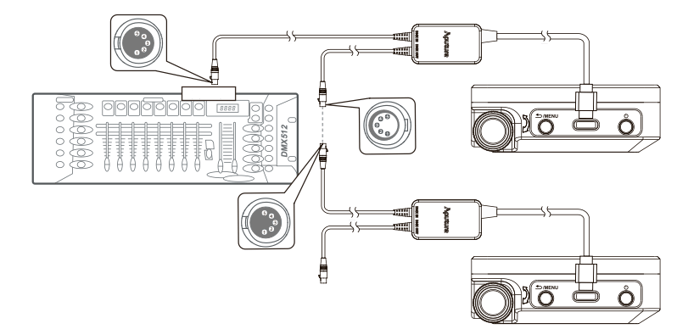
Daisy chaining multiple lights over DMX using 5-pin DMX Cables and the Aputure Active USB-C to 5-Pin DMX In & Out Adapter*.
* "Aputure Active USB-C to 5-Pin DMX In & Out Adapter" sold separately.
Set the DMX Address, DMX Profile, DMX Loss Behavior, and DMX Smoothing in DMX Settings. When the MC Pro receives DMX, the DMX Status Screen shows the profile, battery level, and DMX Address.
To patch and configure your MC Pros automatically, see What is Auto-Patching? in Sidus Link Pro.
Download the MC Pro DMX Chart from the Downloads section of the MC Pro product page.